dbt
dbt projects
How mxds finds a dbt project, which profile, target and dbt it uses, and what the editor knows about your models.
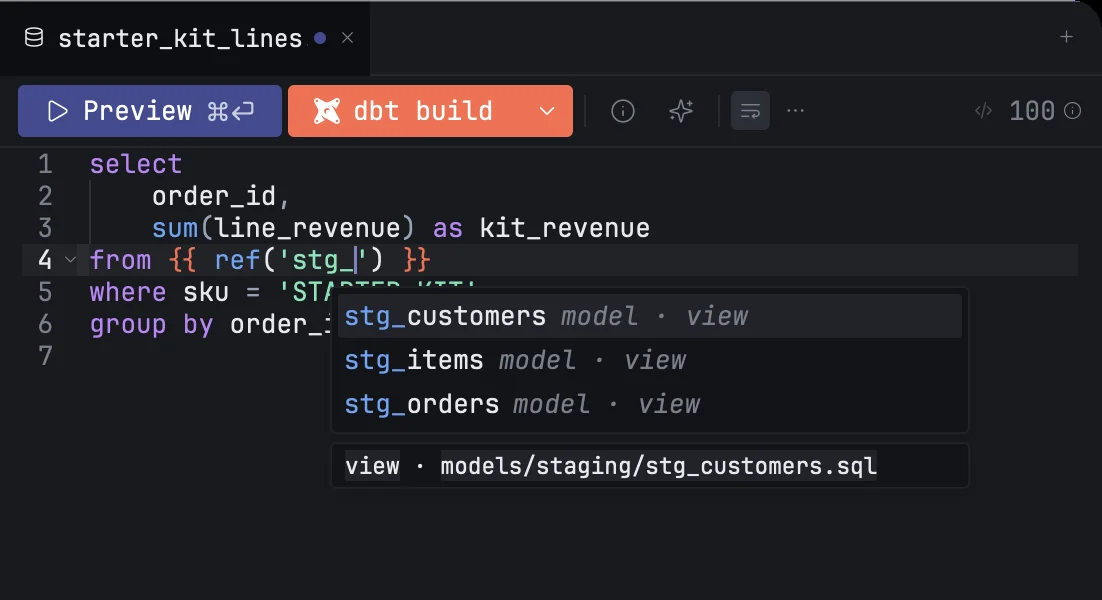
Open a folder that holds a dbt project and every model in it opens as a dbt model: Jinja is highlighted, ref() and source() complete, problems are listed as you type, and the toolbar offers Preview and dbt build instead of Run. mxds reads the project's files itself, so none of this needs a dbt run first.
How mxds finds the project
mxds looks for dbt_project.yml anywhere in the folder you opened, including folders your .gitignore excludes. It skips dbt_packages, dbt_modules, target, .venv, venv, node_modules, .git and logs, because the dbt_project.yml files in those belong to someone else. If it finds more than one project, it uses the outermost.
A file is a model when it is a .sql file under one of the model paths in dbt_project.yml. Models of installed packages are not yours and open as plain SQL. A .sql file that contains Jinja but is not a model of the open project will not run: mxds says so instead of sending the raw template to a database.
When you save a file, mxds picks up the change a moment later. If dbt has already written manifest.json or catalog.json into the project's target folder, mxds reads them for descriptions, column lists, materializations and schemas. It never runs dbt to get them.
A warning sign next to dbt build means the project could not be reloaded; hover it for the reason.
Profiles and targets
mxds reads profiles.yml the way dbt does and takes the first one it finds:
| Order | Where |
|---|---|
| 1 | the folder set in Settings › dbt › Profiles directory |
| 2 | the folder in the DBT_PROFILES_DIR environment variable |
| 3 | the project folder |
| 4 | ~/.dbt/ |
An app opened from the Dock or Finder does not see the environment variables you set in your shell profile. If you rely on DBT_PROFILES_DIR, put the same folder in Settings instead.
A model tab has no connection menu: it runs on a target of the project's profile. It starts on the profile's target:, or on its only output if there is just one. To use another target, click the arrow next to dbt build and pick it in the Target row. Each tab remembers its target, and Preview, Explain and Build all use it.
Preview can connect to DuckDB (a file on your Mac, not MotherDuck or a remote path), SQLite, PostgreSQL, Redshift, BigQuery with a service account, Snowflake, Databricks, Trino, ClickHouse and MySQL targets. On any other target, Preview shows the reason in place of a result. dbt build works on every target, because it runs your own dbt.
Which dbt mxds runs
Build, the Lineage refresh button and the compile fallback all run your own dbt. mxds looks for it in this order:
- the path in Settings › dbt › dbt path;
.venv/bin/dbtinside the project;- a dbt installed with
uv tool install; - your
PATH, including the one your login shell sets up, so dbt from Homebrew, conda or asdf is found even when mxds was opened from the Dock.
If you set a path and it does not point to a program, mxds stops there and says which path failed. It does not quietly run a different dbt. Hover dbt build to see why it is disabled when dbt is not found.
Completion and navigation
| Where the caret is | mxds offers |
|---|---|
ref('… |
the project's models |
source('… |
the sources declared in your schema YAML |
source('raw', '… |
the tables of that source |
{{ … |
macros of the project and its packages |
{{ dbt_utils.… |
macros of that package |
Each item carries what mxds knows about it: the file path, tags, materialization, description and columns, as far as the YAML and the manifest tell. Hover a ref, a source or a macro call to see the same card. ⌘-click it to open the model file, the YAML line that declares the source, or the macro's definition.
Problems
dbt problems appear in the Problems tab next to SQL lint warnings. Inside a model:
- a
ref()to a model that does not exist, or to a version it does not declare; - a
source()that no schema YAML declares; - a call to a macro that neither the project nor its packages define;
- Jinja that will not parse, such as an
{% if %}without its{% endif %}; - a macro defined inside a model file instead of under the macro paths.
Click one to put the caret on it. Problems about the project as a whole are listed under Project, whichever tab is open: a cycle between models, a schema YAML file that cannot be read, a missing profiles.yml or profile, a project that failed to reload, and a dbt run that could not start.
Copy with dbt refs replaced
⌘⇧C in a model copies the selection, or the whole model when nothing is selected, as SQL another tool can run. Every ref(), source() and this becomes the real table name on the tab's target, and the rest of the Jinja is wrapped in /* … */ comments. A notice tells you how many were replaced, and names any reference mxds could not resolve.
Paste as dbt refs
⌘⇧V in a model does the reverse. Table names that a model or source of this project produces become {{ ref() }} and {{ source() }}, and Jinja commented out by a copy comes back. If the text was copied with ⌘⇧C from this same project, the original model text is pasted back exactly. A table name that two different nodes produce is left as it is.
Both commands are also in the Edit menu and the command palette.